Cirrux Update – Connect your AI assistant to Cirrux + Superfans have Docs
October 16, 2026
Hi everyone,
I decided to send this update a bit faster than I originally planned because of a really nice new feature: you can now connect ChatGPT, Claude, Mistral or any other assistant that supports MCP straight to your Cirrux mail and calendar. Nothing to install, nothing to configure beyond pasting a URL. Drive also got a lot better at sharing: you can now share files and folders with anyone, not just your colleagues. Below that, a long list of fixes and improvements across Mail, Calendar and the API.
Enjoy reading!
Connect your AI assistant to Cirrux
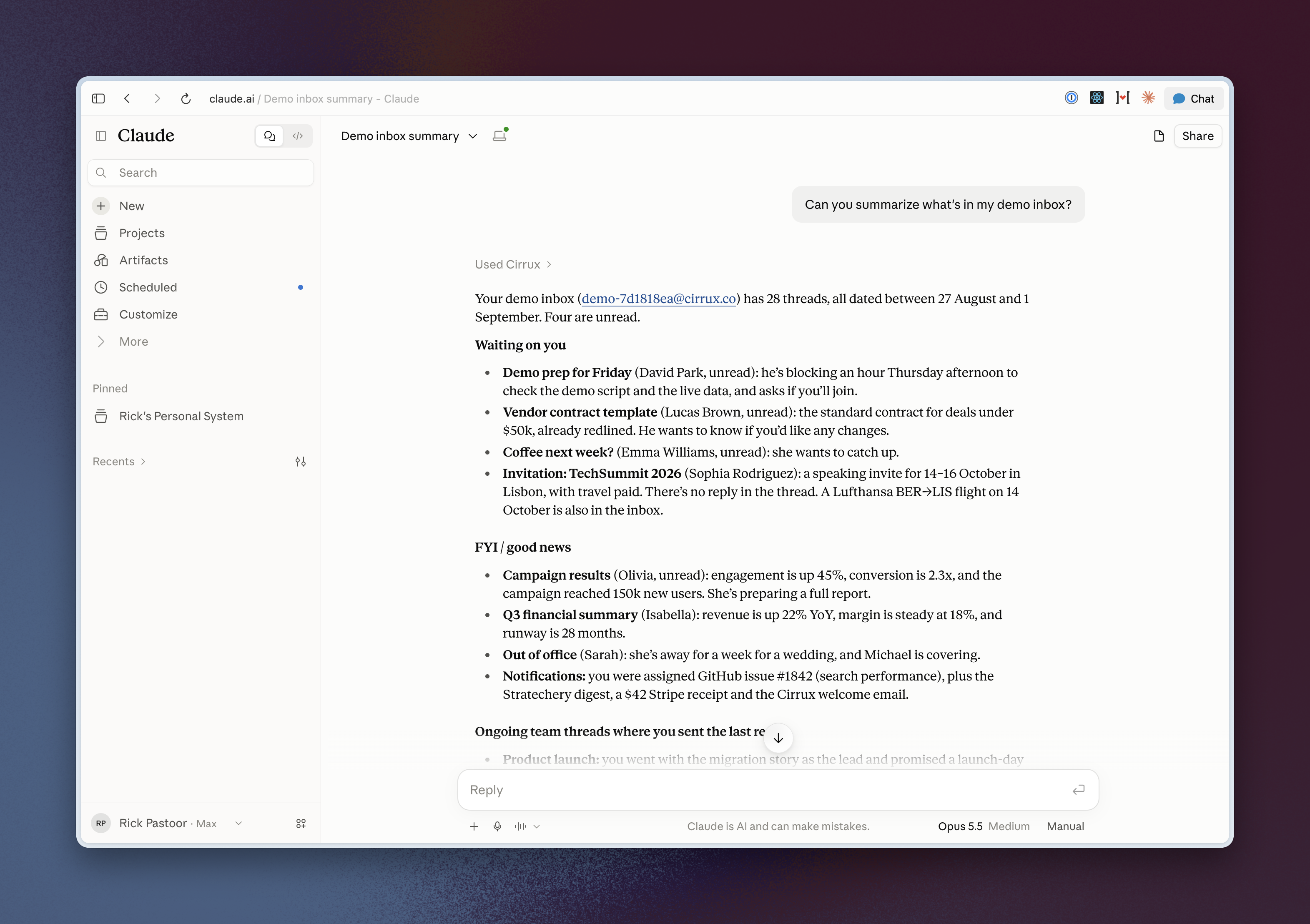
The CLI has been the way to let an AI work with your mail for a while now, and a lot of you use it. But it needs a terminal, and most people talk to their assistant in a chat window. So Cirrux now runs an MCP server. Add a custom connector in your assistant, paste https://mcp.cirrux.info/mcp, sign in to Cirrux and approve. That's it.
Once connected, your assistant can search and read your mail and attachments, archive, label, star, snooze and trash threads, and write drafts. It can look up your events, create, move and delete them, and accept or decline invitations. Ask it "what came in today that I actually need to answer?" or "move my Thursday call with Jane to next week" and it does the work in your account. It only sends an email when you ask it to, and most assistants ask you to confirm first.
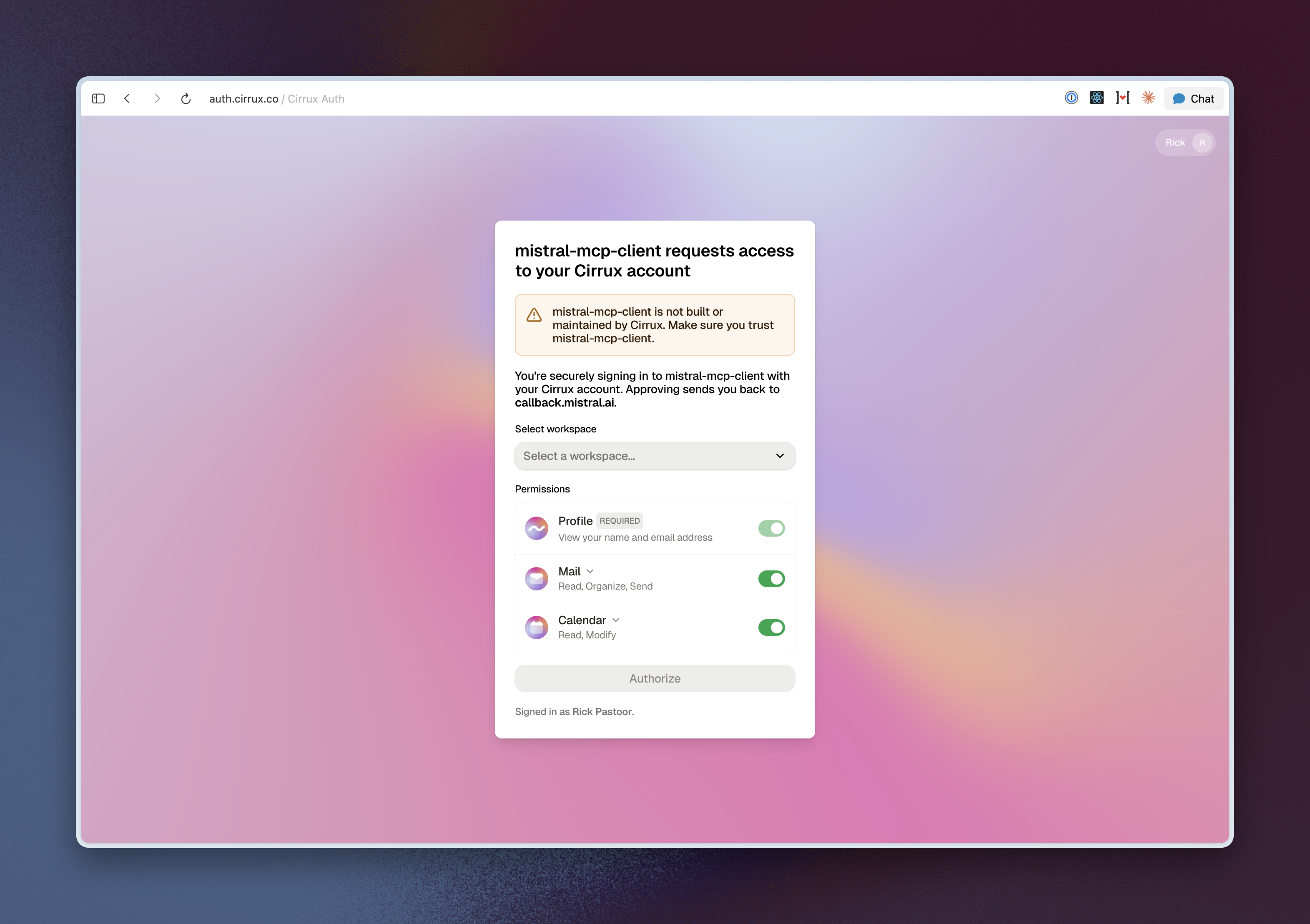
You decide what it's allowed to do when you connect it. You can switch Mail or Calendar off entirely, or give read access without sending. Everything it changes shows up in your activity feed, and you can revoke it any time under Settings → Security. One very important detail: whatever your assistant reads from your mail goes to the company behind that assistant, the same as anything else you paste into a chat. Only connect one you trust with your mail.
There are step by step guides for ChatGPT, Claude and Mistral. Using something else? The MCP guide covers any other assistant that supports MCP.
Share files and folders with anyone
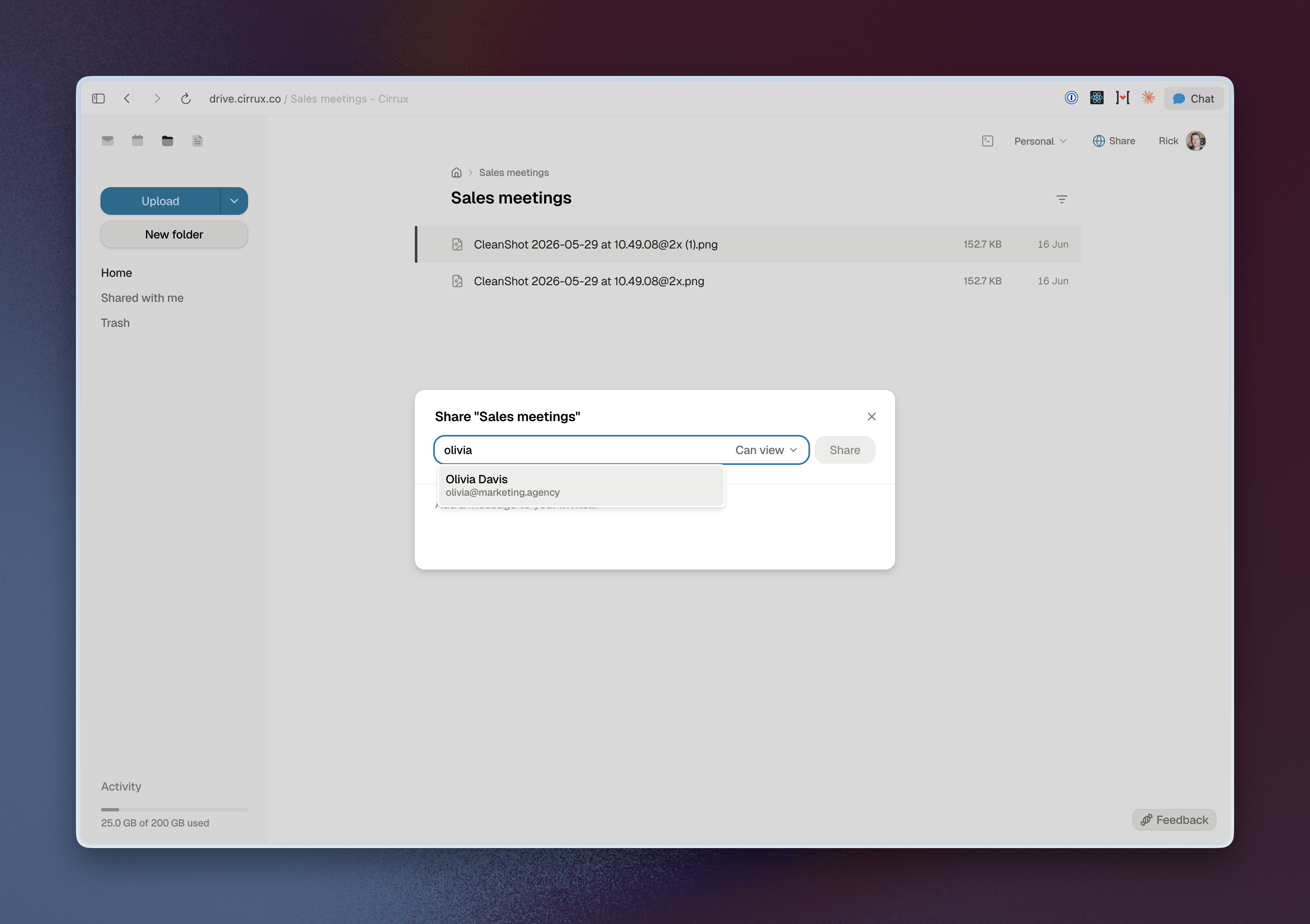
Until now, sharing in Drive stopped at the edge of your workspace: colleagues, or a public link. You can now share a file or folder with anyone by typing their email address in the share dialog. People you've emailed and your contacts show up as suggestions while you type.
If they already use Cirrux in another workspace, the share shows up under Shared with me in their Drive, where they accept it (or decline it). Nothing lands in someone's Drive without them saying yes. If they don't have a Cirrux account yet, they get an email with an invite, and they can create a free Cirrux account to open what you shared.
And if someone opens a link to something they can't see, they can ask you for access right there. You approve or decline it from the share dialog.
Fixes and improvements
- Improvement: You can change the text color and highlight text in the composer.
- Improvement: The quoted original email and your signature are now editable. They're still a separate block, so editing them feels a little different from the rest of your email, but you can trim a long quote down to the part that matters instead of only keeping it or removing it.
- Improvement: Filters can forward to several addresses at once. You can add a new forwarding address right from the filter dialog, and you can set up the filter before the address is verified (it starts forwarding once it is).
- Improvement: Snoozing understands a lot more ways of writing a date and time, including month names and numeric dates, and Mail and Calendar now understand exactly the same phrases.
- Improvement: Mail, Drive and Docs lists have a quick filter and sort panel, so in Mail you can show only unread or starred email with one click.
- Improvement: When you move through a list with the keyboard and an email drops out of it (say you archive it), the selection no longer jumps to wherever your mouse happens to be. It only follows the mouse when you actually move it.
- Improvement: Pressing Enter in the subject field takes you to the body of the email.
- Improvement: Emails that use custom web fonts now show them. The fonts load through our servers, so the sender can't see that you opened their email.
- Fixed: Emails built with certain table layouts rendered wrong.
- Improvement: Search understands
ORand parentheses, like Gmail:from:jane (invoice OR receipt). Andin:trashandin:spamnow actually find what's in there; they used to return nothing. - Fixed: Searching for emails that are not starred or not unread searched for the opposite.
- Improvement: I keep tuning the new spam filter. If something lands in the wrong place, please keep moving it to (or out of) Junk. That's exactly what I use to make it better.
- Fixed: If your assistant or a script replaced a draft while you had the thread open, you kept seeing the old version. The new one now appears straight away.
Calendar
- Improvement: Calendar is quite a bit faster, especially for large calendars with lots of recurring events.
- Improvement: On a phone, event details open in a sheet that slides up from the bottom.
- Fixed: Creating an event on a phone didn't really work. Long press on the grid (and drag, if you like) to create one.
- Improvement: Paste an email address into the participants field and it's added right away.
- Improvement: You can also subscribe to a calendar from Settings → Mailboxes → Calendars.
- Fixed: Gmail and Proton ignore the link field in calendar invites, so guests on those never saw it. We now put the link in the description, and in the location if you didn't set one. I also spent a bit of time making the invite emails a bit more polished and easier to scan.
API and CLI
- Improvement: The CLI and the API can do a lot more with your mail: write, update and send drafts, archive, label, star and trash threads, and snooze emails. They can also manage your mailbox addresses (aliases) and answer calendar invites.
Account and everything else
- Improvement: Cirrux now follows the timezone of the device you're on, so when you travel your calendar and times move with you. Prefer a fixed one? Switch that off and set your timezone in your profile.
- Improvement: SEPA Direct Debit is now available as a payment method.
- Improvement: When you give an app or assistant access to your account, you get an email confirming it, so you'll notice if it wasn't you.
- Fixed: Registering a physical security key (like a YubiKey) for two-factor authentication was blocked. It works now.
- Fixed: Importing contacts from Google skipped nicknames and birthdays. New imports bring them along.
What's next
- Cirrux Docs: Superfans have access to Docs today, so if you're one, open the app switcher and give it a go. A full update on Docs is coming in the next week or two.
- Sync for Outlook: I'm testing ongoing sync with Microsoft 365 right now. If you want to try it, reply to this email and I'll let you in.
- Cirrux Meet: A new one on the horizon and it's a big one: I started working on the technical architecture to support virtual meetings. As soon as Docs and Outlook Sync are stable I'll start on this.
As always, reply to this email, or use the Telegram and Signal buttons on the website, if something's broken or missing. I read everything.
Have a great weekend,
Rick